Equine Billing Software: How to Choose the Right System for Your Horse Business (2026 Guide)
Equine billing software is a tool that helps horse businesses create invoices, collect online payments, manage recurring charges, and track customer balances, built specifically for the way boarding facilities, trainers, and farriers actually operate. Unlike generic accounting tools, the best equine billing platforms connect daily barn activity (board, training rides, lessons, farrier visits, supplements) directly to invoicing, so services get captured and billed instead of forgotten.
This guide explains what equine billing software does, the features that matter, how it differs by business type, and how to choose a platform, including where most horse businesses actually lose money.
The real billing problem isn't collecting payments, it's capturing charges
Most barn owners worry about late payments. The bigger, quieter loss is revenue that never gets billed at all.
A lesson gets written on a whiteboard. A supplement charge gets texted to the barn manager. A training ride lands in a notebook. A farrier visit gets mentioned in a group chat. At month-end, someone tries to reconstruct it all into invoices, and some of it simply doesn't make it. This is one of the most common horse boarding billing mistakes, and it usually happens because care, services, and invoices live in separate places.
Here's the scale of it. Take a 40-horse barn that misses just three billable training rides a week at $45 each. That's $135 a week, roughly $7,000 a year, gone. Not from non-payment, but from charges that were never invoiced in the first place. Add forgotten blanketing, supplement administration, and one-time services across fifty or more horses and the annual figure climbs well past that.
Late payments are visible, so they get attention. Missed charges are invisible, which is exactly why they cost more. Equine billing software solves the invisible problem by connecting care to billing: the work gets recorded once, then flows into an invoice for review before it's sent. If you're still building invoices by hand, the problems with manual horse boarding invoicing go deeper than lost time.
What equine billing software does
At its core, equine billing software handles four jobs:
- Invoicing turns services and recurring fees into accurate invoices.
- Payments collect money online via ACH and credit card.
- Recurring billing automates predictable monthly charges like board.
- Balance tracking shows who owes what, and what's overdue.
Purpose-built platforms go further by linking billing to the operational systems a horse business already uses, including horse records, scheduling, care tracking, and owner communication, so an invoice reflects what actually happened in the barn. This is the difference between a basic invoicing tool and full horse management software.
Features to look for in equine billing software
Not every billing tool understands stalls, board, training packages, or farrier routes. When comparing platforms, prioritize these capabilities:
- Recurring billing for board, training programs, and standing services, set once and billed automatically each cycle.
- Online payments (ACH and card) so owners can pay the way they expect to.
- AutoPay to reduce collections work and stabilize monthly cash flow.
- Service-based billing that turns completed lessons, rides, and visits into invoice line items.
- Review-before-send workflow so charges are confirmed by a human, not auto-charged blindly.
- Payment reminders sent automatically before staff have to chase anyone.
- Reporting on open balances, paid invoices, recurring revenue, and aging receivables.
- Owner portal where clients view invoices, payment history, and care updates without emailing the barn.
- Secure funds handling for deposits and payments (more on why this matters below).
How equine billing software differs by business type
The right system depends on how you bill. The three main models:
Boarding facilities run mostly on recurring revenue: monthly board, stall upgrades, supplements, blanketing, medication, trailer parking, and security deposits, often across dozens or hundreds of horses. The priority is automating recurring invoices and keeping billing in sync with operational changes like stall moves, board-type changes, and move-outs. Dedicated horse facility software keeps billing connected to stall occupancy and horse records, and you can read how to automate horse boarding invoices specifically.
Trainers and coaches bill primarily for services delivered: lessons, training rides, clinics, show support, and travel fees. The priority is connecting scheduling to invoicing so completed appointments become billable revenue without manual re-entry. See our guide to the best software for riding school management for how coaching businesses handle this.
Farriers work mobile, managing appointments, horse notes, and payments from a phone between stops. The priority is fast invoicing, on-the-road payment collection, and a record of unpaid balances, ideally alongside scheduling and route planning. Our roundup of the best farrier management software covers the mobile workflow in detail.
A general accounting product (QuickBooks, Sage) can handle the ledger, but won't understand these workflows natively. A purpose-built equine platform captures the charge at the point of care.
Why funds handling is a feature, not a footnote
Most billing articles skip this. They shouldn't. The moment a platform collects ACH payments and holds security deposits on your behalf, how those funds are handled becomes a real operational and legal concern.
Passing payment-processing fees to horse owners in a way that leaves the held deposit balance lower than what the owner paid creates trust-accounting and legal exposure, even if it's disclosed as a separate line item. A well-designed platform absorbs or grosses up those fees so the deposit held matches the deposit owed, and reconciles balances on a regular cycle. Our guide to security deposit tracking for horse boarding explains why this matters.
When you evaluate equine billing software, ask the vendor directly: How are security deposits held? Are processing fees deducted from deposit balances? How often are funds reconciled? A platform that can answer clearly is protecting you; one that can't is a liability you'll inherit.
How to choose: a short checklist
- Match the billing model to recurring (boarding), service-based (trainers), or mobile (farriers).
- Confirm care-to-invoice flow. Can services be captured where they happen and reviewed before billing?
- Check payment options: ACH, card, AutoPay, automated reminders.
- Interrogate funds handling, including deposit safety and fee treatment, per the section above.
- Look at the owner experience. A portal reduces disputes and follow-up messages, which improves owner transparency at your facility.
- Weigh all-in-one vs. add-on. Does it replace your scattered tools, or add another one? The ROI of boarding barn software is easier to justify when one platform replaces several.
How Stables connects care, billing, and payments
Most equestrian software organizes records. Stables is built around operations, connecting the full workflow:
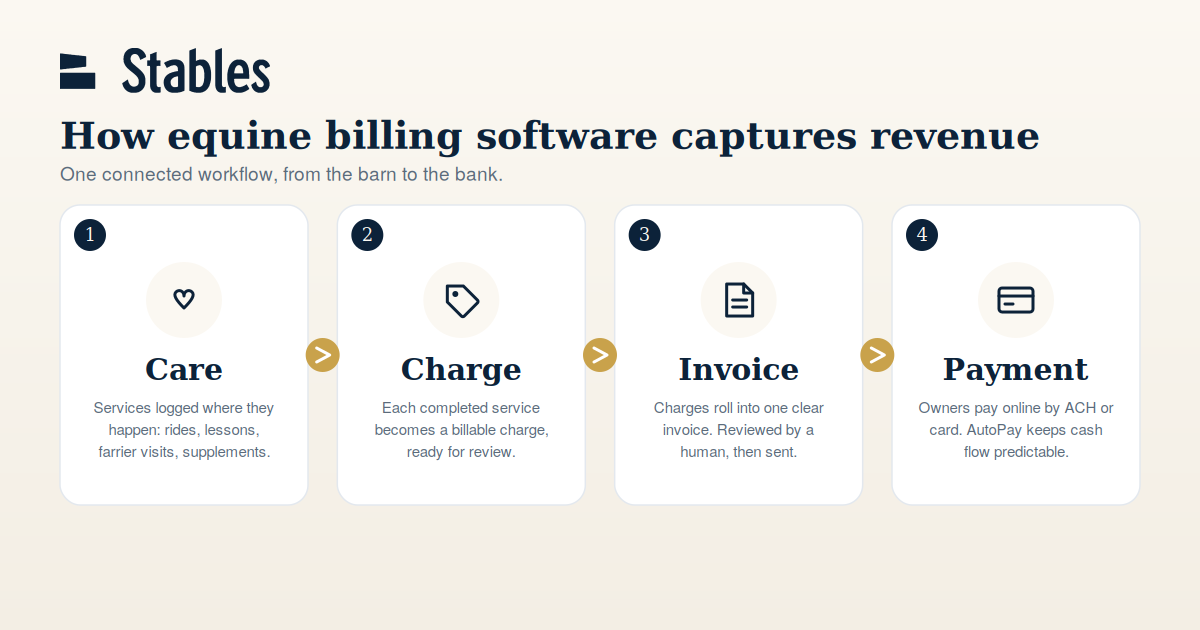
Care, then Charge, then Invoice, then Payment.
Services get tracked where they happen, flow into invoices for review, and owners pay online, so fewer charges slip through, cash flow gets more predictable, and admin time drops. Stables handles security deposits and payments with the trust-accounting discipline described above, not as an afterthought.
For facilities managing stalls, recurring board, service add-ons, and deposits, Stables supports the broader operation alongside billing. You can see features or view pricing to compare.
Learn more about how Stables helps horse businesses automate billing, collect payments, and capture more revenue.