Horse Stall Management Software: How to Track Occupancy and Revenue Per Stall
Horse boarding facilities operate on a simple economic engine: stalls generate revenue. Yet many barns still track stall assignments and billing through spreadsheets, whiteboards, or text messages. That approach works when a barn has ten horses. It breaks down quickly once a facility scales.
Stall management software solves this by centralizing stall assignments, occupancy tracking, billing, and operational data into a single system. Facility managers gain real-time visibility into which stalls are occupied, which horses are assigned, and how much revenue each stall produces.
This article explains how modern stall management systems work, the key metrics facilities should track, and why spreadsheet-based management quietly drains revenue.
What Is Stall Management Software?
Stall management software is a system designed to help boarding facilities organize stalls, horses, and clients while tracking occupancy and revenue.
A modern platform typically includes:
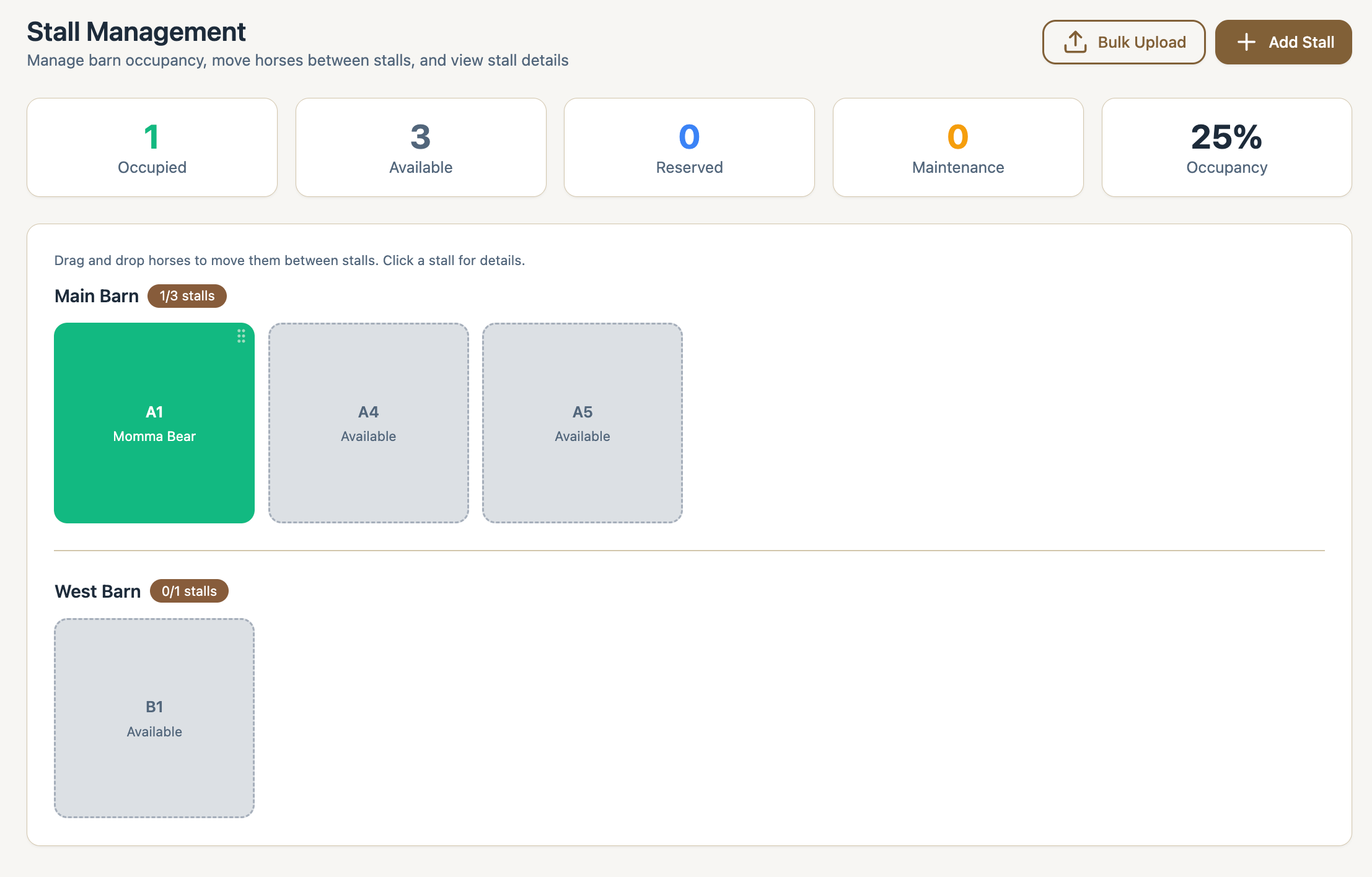
- Visual stall maps or drag and drop stall boards
- Horse assignments to stalls
- Client and horse profiles
- Billing tied to stall occupancy
- Care plans and service tracking
- Reporting on occupancy and revenue
- Per stall security deposit tracking
Instead of manually tracking stall changes or updating spreadsheets, barn managers can simply drag a horse into a stall and the system updates occupancy and billing automatically.
For facilities evaluating platforms, this capability is often discussed alongside the broader category of horse management software. If you are comparing systems across the industry, see our guide to best horse management software.
Why Stall Tracking Matters for Boarding Facilities
Every stall represents a revenue unit. When stall utilization drops or billing becomes inconsistent, revenue leaks appear.
Common problems facilities experience include:
- Empty stalls that go unnoticed
- Horses moved between stalls without billing updates
- Temporary boarders never added to the spreadsheet
- Discounts applied inconsistently
- Staff unaware which stalls are open
These issues often seem small but compound quickly.
For example, a 30-stall barn charging $1,200 per month loses $14,400 per year if just one stall sits vacant unnoticed for twelve months.
Stall management software eliminates this blind spot by providing a real-time occupancy view.
Key Occupancy KPIs Every Barn Should Track
Facilities that treat stalls like revenue units typically monitor several key performance indicators.
1. Stall Occupancy Rate
Occupancy rate measures how many stalls are currently filled.
Formula:
Occupancy Rate = Occupied Stalls ÷ Total Stalls
Example:
- Total stalls: 40
- Occupied stalls: 36
Occupancy rate = 90%
Most profitable facilities operate between 90% and 98% occupancy.
2. Stall Vacancy Rate
Vacancy rate is simply the inverse of occupancy.
Formula:
Vacancy Rate = Vacant Stalls ÷ Total Stalls
Example:
- Vacant stalls: 4
- Total stalls: 40
Vacancy rate = 10%
Even a small increase in vacancy has a large financial impact, which is why stall management dashboards often highlight open stalls immediately.
3. Revenue Per Stall
Revenue per stall measures how much income each stall generates.
Formula:
Revenue Per Stall = Total Boarding Revenue ÷ Total Stalls
Example:
- Monthly boarding revenue: $48,000
- Total stalls: 40
Revenue per stall = $1,200
This metric helps facilities evaluate pricing changes, service upgrades, and facility improvements.
4. Revenue Per Occupied Stall
This metric isolates revenue generated by filled stalls only.
Formula:
Revenue Per Occupied Stall = Total Boarding Revenue ÷ Occupied Stalls
Example:
- Monthly revenue: $48,000
- Occupied stalls: 36
Revenue per occupied stall = $1,333
If this number rises while occupancy stays stable, the facility is successfully increasing services or pricing.
Why Spreadsheets Fail at Stall Management
Many barns begin with spreadsheets because they appear simple and flexible. Unfortunately they introduce several operational risks.
1. No Real-Time Visibility
Spreadsheets require manual updates. If a horse moves stalls or leaves unexpectedly, the data becomes outdated immediately.
Staff may believe a stall is filled when it is actually empty.
2. Billing Disconnect
When stall tracking lives in a spreadsheet and boarding billing lives in accounting software, the two systems drift apart.
This often leads to:
- Missed board charges
- Incorrect billing after stall moves
- Temporary boarders not invoiced
Facilities frequently discover thousands of dollars in lost revenue when they audit their spreadsheets.
3. Collaboration Problems
Barn operations involve multiple people: managers, trainers, staff, and sometimes owners.
Spreadsheets introduce version conflicts such as:
- Multiple copies of the same sheet
- Edits overwriting each other
- Staff using outdated files
4. No Operational Intelligence
Spreadsheets cannot easily calculate operational metrics such as:
- Average stall turnover
- Revenue per stall
- Occupancy trends
- Revenue by trainer or barn section
Modern stall management software automatically generates these insights.
Visual Comparison: Spreadsheet vs Stall Management Software
Visual Comparison: Spreadsheet vs Stall Management Software
| Feature | Spreadsheet Stall Tracking | Stall Management Software |
|---|---|---|
| Stall occupancy view | Static rows and columns | Visual stall board |
| Stall moves | Manual updates | Drag and drop |
| Billing integration | Separate systems | Linked to stall assignments |
| Revenue per stall reporting | Manual calculation | Automatic dashboards |
| Multi-user collaboration | Error-prone | Real-time |
| Vacancy alerts | None | Automatic |
The visual stall board is often the most impactful feature. Managers can immediately see which stalls are filled, open, or reserved.
How Modern Stall Management Software Works
Modern systems combine stall tracking with the rest of barn operations.
A typical workflow looks like this:
- Add stalls to the facility layout
- Create horse and owner profiles
- Assign horses to stalls
- Link stall occupancy to boarding charges
- Track services such as lessons, training, and care
- Monitor occupancy and revenue dashboards
When a horse moves stalls or leaves the facility, the system updates occupancy and billing automatically.
The Strategic Advantage of Drag and Drop Stall Management
Drag and drop stall boards are quickly becoming a core differentiator in stall management software.
Instead of editing rows in a spreadsheet, barn managers simply move horses between stalls visually.
Benefits include:
- Immediate vacancy visibility
- Faster stall reassignment
- Fewer billing mistakes
- Clear facility layout
- Better operational awareness for staff
For facilities with 20 to 100 stalls, this can save hours each month while preventing missed revenue.
Choosing the Right Stall Management Software
When evaluating software, facility owners should look for several core capabilities.
Essential features include:
- Visual stall board
- Drag and drop stall assignment
- Horse and owner management
- Integrated billing
- Occupancy reporting
- Revenue dashboards
- Staff access controls
- Mobile access
The best platforms combine operational management with financial insights so facilities can see exactly how each stall contributes to revenue.
Final Thoughts
Stalls are the economic foundation of a boarding facility. Yet many barns still manage them using tools that provide little visibility into occupancy or revenue.
Stall management software transforms stall tracking from a spreadsheet exercise into a real-time operational dashboard. Facilities can see open stalls immediately, understand their occupancy trends, and track revenue per stall with precision.
For barn owners looking to modernize operations, stall management software is often the first step toward building a fully connected barn management system.
Try Stables Stall Management Software
Managing stalls with spreadsheets makes it nearly impossible to maintain accurate occupancy data, track revenue per stall, or prevent missed charges. Modern stall management software eliminates these problems by giving your facility a real-time view of stalls, horses, and billing.
Stables was built specifically for boarding facilities that want a simple, visual way to manage stall occupancy and revenue.
With Stables you can:
- View your entire barn using a drag and drop stall board
- Instantly see open and occupied stalls
- Assign horses to stalls in seconds
- Automatically connect stall occupancy to boarding invoices
- Track revenue per stall and facility occupancy
- Manage horses, owners, care plans, and billing in one platform
Instead of juggling spreadsheets, texts, and billing systems, Stables centralizes your barn operations in one place.
Start Managing Your Stalls Smarter
If you want to stop guessing which stalls are filled and start tracking real occupancy and revenue metrics, try Stables.
👉 Start your free account: https://stables.co
Or learn more about how stall tracking fits into a full barn operating system in our guide to best horse management software.