Managing Pending Charges
Learn how to add, edit, schedule, invoice, and void one-time charges before they are billed to horse owners.
Pending charges let your facility record one-time fees without immediately sending a separate invoice.
You can add charges for services such as medication administration, extra bedding, farrier holds, training sessions, or other billable care. Stables can include these charges on the horse owner’s next scheduled invoice or hold them until you decide how they should be billed.
A pending charge is not yet an invoice. It does not become part of the client’s open balance until it is included on a finalized invoice.
Where to find pending charges
Go to:
Finances → Invoices → Pending Charges
The Pending Charges tab shows one-time charges that have been recorded but have not yet been billed.
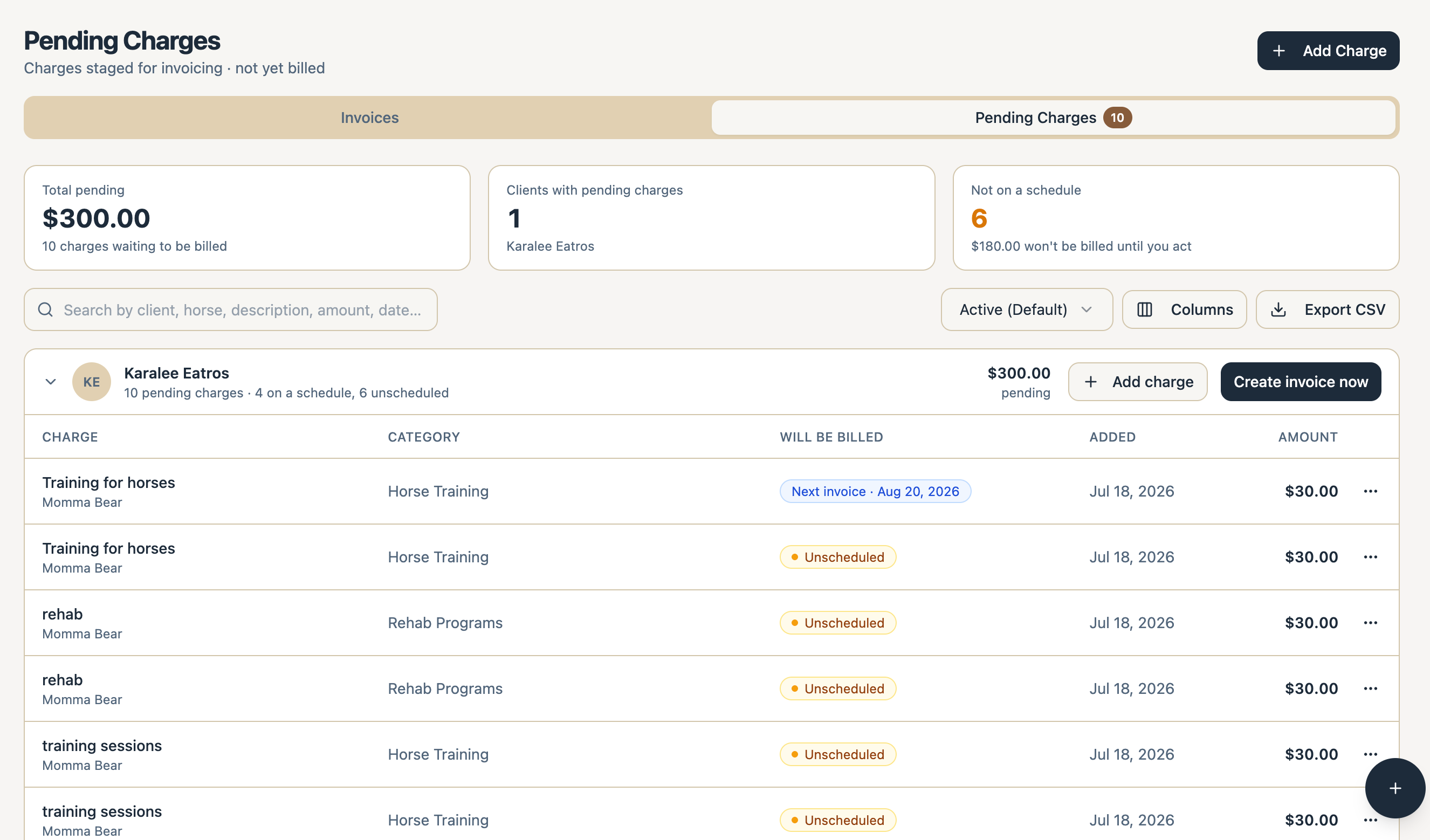
The page summarizes:
- Total Pending: All charges and the total dollar amount waiting to be invoiced - this includes those charges that have been added to a future billing schedule and those that have not
- Scheduled: Charges assigned to an upcoming billing schedule
- Unscheduled: Charges that do not yet have a billing destination
If a scheduled charge has an issue syncing to Stripe after adding to a billing cycle, that charge will get re-added to the charges table with the status “Unscheduled” along with an error tooltip so you know.
Pending charge statuses
Scheduled
The charge is assigned to an upcoming billing schedule and will be included on that client’s next applicable invoice.
Example:
Scheduled for August 1, 2026
Monthly on the 1st
Unscheduled
The charge has been saved, but the client does not have an upcoming billing schedule assigned to it.
You can leave the charge unscheduled until you are ready to:
- Assign it to an upcoming invoice
- Include it on a standalone invoice
- Void it
Needs Review
Stables encountered an issue preparing the charge for billing.
The charge remains visible with the status Unscheduled and is not silently discarded. You can re-add this charge to a future billing schedule or create an invoice specifically for that charge. Contact Stables Support if the issue cannot be resolved.
Invoiced
The charge has been included on an invoice and can no longer be edited as a pending charge.
Voided
The charge was canceled and will not be billed. You can use the voided status filter to review voided charges.
Add a pending charge
To create a one-time charge:
- Go to Finances → Invoices → Pending Charges.
- Select Add Charge.
- Choose the client responsible for payment.
- Select a horse, when applicable.
- Enter the charge date.
- Select a saved Service or enter a custom charge.
- Confirm the category, description, quantity, and rate.
- Choose the billing destination.
- Select Add Charge.
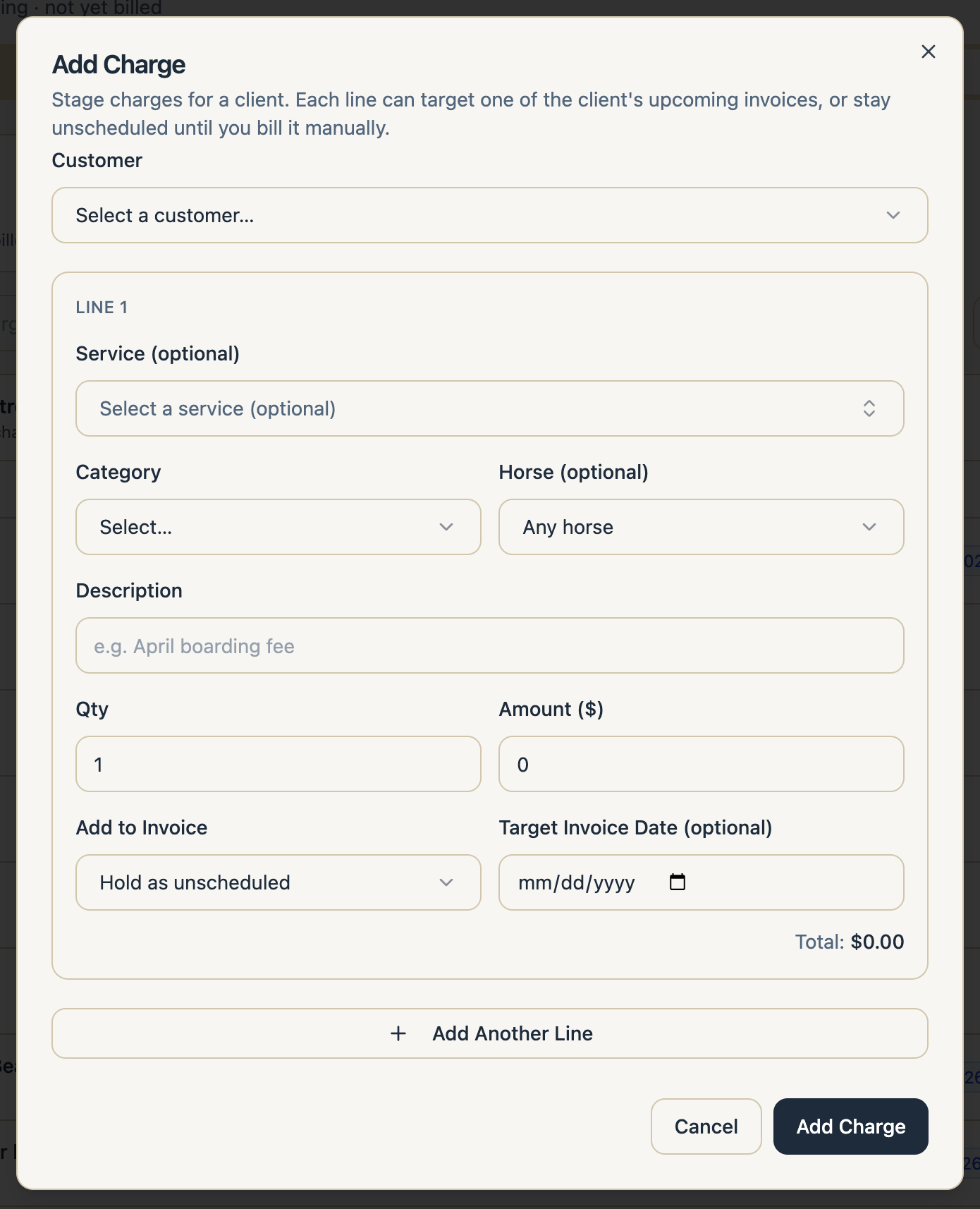
Using a saved Service
Selecting a saved Service automatically fills in its default:
- Invoice category
- Description
- Quantity
- Unit rate
You can adjust those values for the individual charge without changing the saved Service.
For example:
Service: Extra Bedding Quantity: 4 Rate: $15.00 Amount: $60.00
The amount is calculated as:
Quantity × Rate = Amount
Adding a custom charge
You do not have to select a saved Service.
For a custom charge, enter:
- Category
- Description
- Quantity
- Rate
The description becomes the customer-facing name of the invoice line.
Example:
Replacement Halter - Momma Bear 2 × $22.50 $45.00
Choose where the charge will be billed
Add to the next invoice
When the client has an active recurring billing schedule, Stables can assign the charge to the next invoice.
Example:
Add to next invoice
August 1, 2026
Monthly on the 1st
The charge appears once on that invoice. It does not become a recurring charge.
If the invoice cutoff has already passed, Stables may assign the charge to the following billing cycle instead.
Choose another billing schedule
A client may have more than one billing schedule, such as:
- Monthly on the 1st
- Monthly on the 15th
Select the schedule that should receive the charge.
Save as unscheduled
When the client does not have an appropriate upcoming billing schedule, save the charge as unscheduled.
The charge remains available on the Pending Charges page until you assign or invoice it.
Create a standalone invoice
Use a standalone invoice when the facility wants to bill the charge immediately rather than wait for the next recurring invoice.
View pending charge details
Select a pending charge to open its details.
The details view may include:
- Status
- Client
- Horse
- Charge date
- Service or description
- Category
- Quantity and unit rate
- Total amount
- Billing destination
- Source
- Created by
- Related care event
- Billing synchronization status
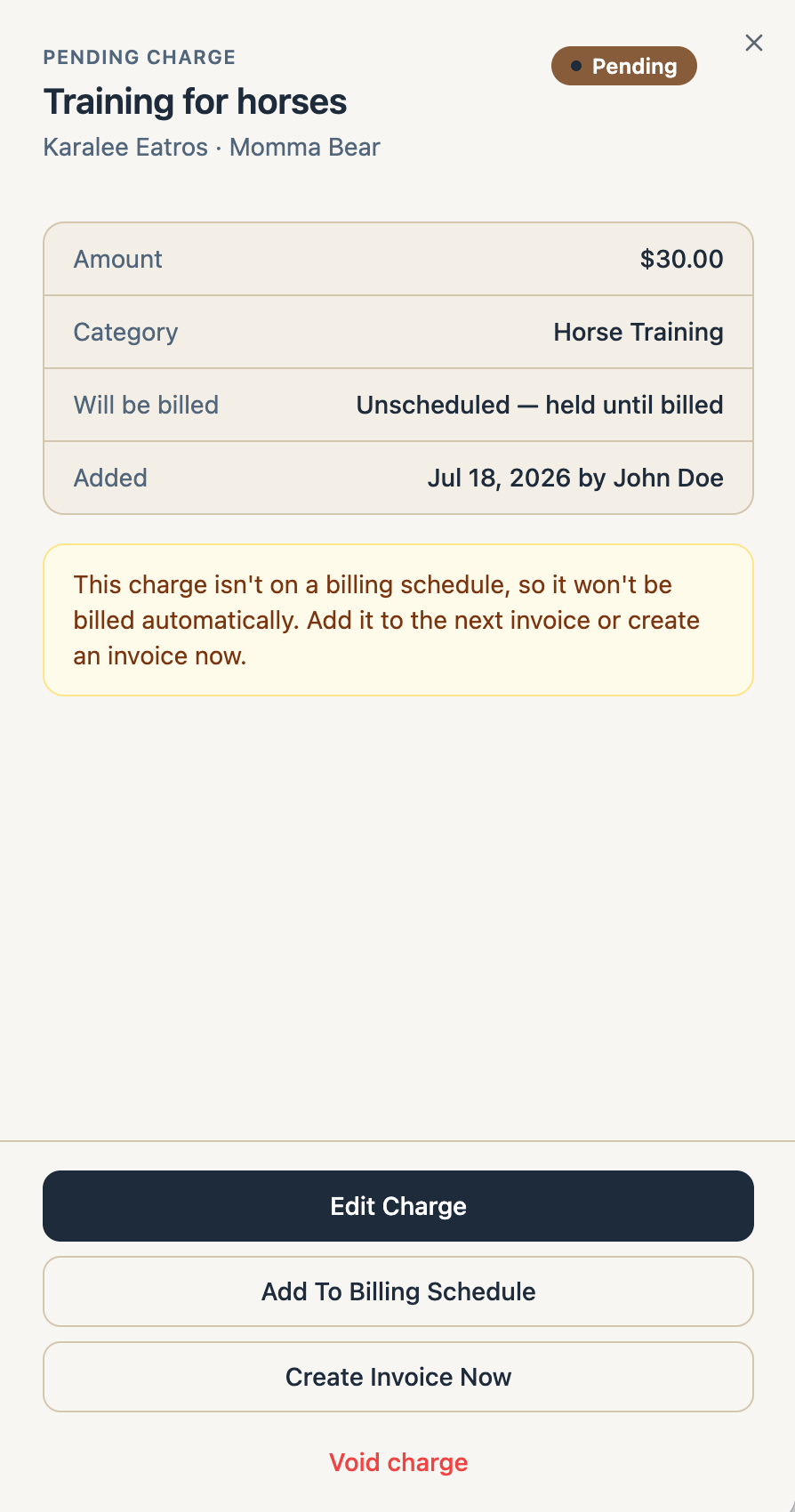
Charges created from completed care include a link back to the source care event where available.
Edit a pending charge
Pending and unscheduled charges can be edited before they are invoiced.
Open the charge and select Edit Charge.
You may be able to change:
- Horse
- Charge date
- Service
- Category
- Description
- Quantity
- Rate
- Billing destination
Changes apply only to that charge. They do not update the saved Service defaults.
Charges that have already been invoiced cannot be edited from the Pending Charges page.
Include pending charges on a standalone invoice
You can include pending charges while creating an invoice.
- Select Create Invoice.
- Choose the client.
- Turn on Include pending charges.
- Select the charges to include.
- Add any additional manual invoice lines.
- Continue to Review & Send.
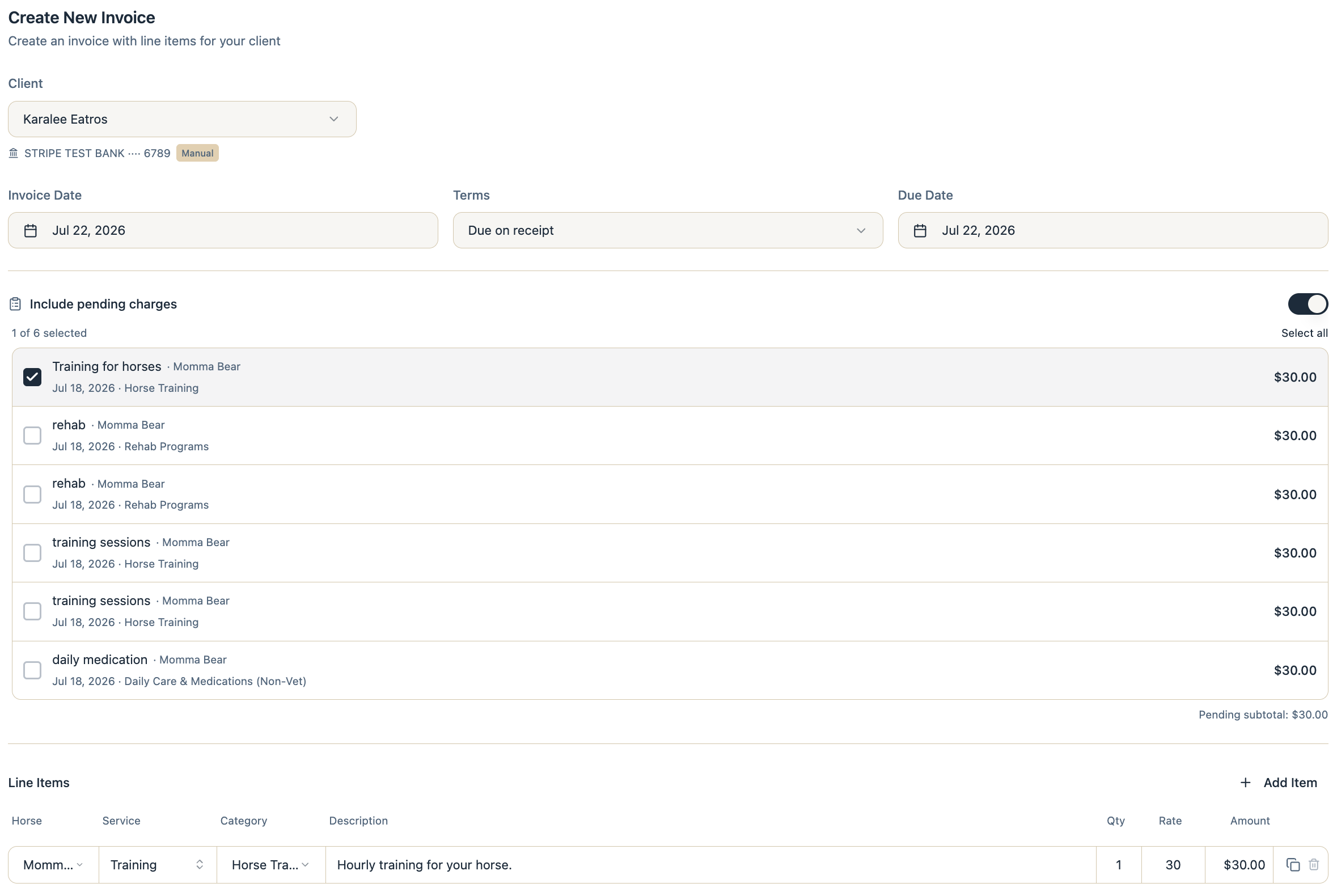
Stables removes the selected charges from their upcoming billing destination before sending the standalone invoice. This prevents them from appearing on both invoices.
If Stables cannot safely remove a charge from the upcoming invoice, the standalone invoice remains a draft and cannot be sent until the issue is resolved.
Void a pending charge
Voiding prevents a pending charge from being billed.
- Open the charge’s action menu.
- Select Void Charge.
- Confirm the action.
The charge remains available for audit history but is excluded from future invoices.
Voiding a charge that shares a customer-facing invoice line with other charges does not remove the other charges. Stables recalculates the remaining quantity and amount.
Pending charges created from care
When completing a care event, authorized staff can enable Charge Owner.
The completion and pending-charge creation happen together. If Stables cannot create the charge, the care event is not marked complete through the charged workflow.
Example:
Care event: Deworming Horse: Momma Bear Rate: $20.00 Billing destination: August 1 invoice
The resulting charge appears in the Pending Charges tab until it is invoiced.
Bulk care completion
When several care events are completed together, Stables creates one underlying charge for each billable care event.
Compatible charges may be combined into one customer-facing invoice line.
Example:
2 training sessions for Momma Bear 2 × $30.00 Total: $60.00
Stables still retains the relationship to both individual care events for audit and record keeping.
Pending charges versus recurring charges
A pending charge is a one-time charge.
Examples:
- Deworming
- One training session
- Extra bedding
- Holding for the farrier
- Replacement supplies
A recurring charge repeats on a billing schedule.
Examples:
- Monthly board
- Monthly blanketing
- Trailer parking
- Recurring supplement administration
- Monthly training programs
To manage repeating charges, go to:
Finances → Recurring Charges
Permissions
Available actions depend on your facility role and billing permissions.
A user may have permission to complete care without having permission to:
- Add charges
- Change pricing
- Create invoices
- Manage recurring charges
- Void charges
Contact a facility owner or administrator if an action is unavailable.
Frequently asked questions
Is a pending charge included in the client’s open balance?
No. A pending charge is not an invoice or accounts receivable. It becomes part of the client’s balance after it is included on a finalized invoice.
Does adding a pending charge email the client?
No. Adding a charge does not send an invoice or notification by itself unless another workflow explicitly notifies the client.
Will a pending charge repeat every month?
No. Pending charges are one-time charges. Use Recurring Charges for fees that should repeat.
Can I add several charges to one invoice?
Yes. A standalone invoice can include multiple pending charges and manually entered line items.
Can charges for multiple horses appear on one invoice?
Yes. Charges may be combined into one invoice when the same client is responsible for payment and the billing settings are compatible. Each invoice line still identifies the applicable horse.
Why was my charge scheduled for the following month?
The upcoming invoice may already have passed its billing cutoff or started processing. Stables moves late charges to the next available billing cycle to avoid duplicate or incomplete billing.
What happens if I void one of several identical care charges?
Stables removes only the voided charge and recalculates the remaining grouped invoice amount.
Can I restore a voided charge?
A voided charge is not automatically restored. Create a new charge or use the appropriate re-bill workflow when the client still needs to be billed.
Why can’t I edit a charge?
The charge may already be invoiced, synchronized for billing, or locked while Stables completes a billing operation. Open the charge details to review its status. If you need to edit a charge to a new billing schedule, you can void that charge and create a new one to replace it.